Fifth Grade SVG and 5th Back to School PNG: What Designers and Educators Actually Need to Know
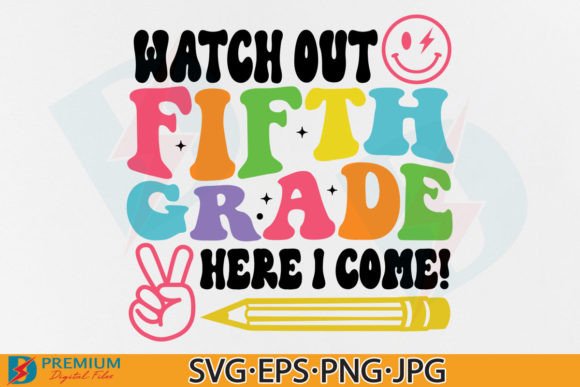
When preparing for the new school year—or supporting a child’s transition into fifth grade—many parents, teachers, and small-business crafters seek versatile, high-quality design assets. Fifth Grade SVG and 5th Back to School PNG files fill that need precisely: they’re ready-to-use digital graphics optimized for classroom decor, personalized apparel, learning tools, and DIY projects. But not all back-to-school design files are created equal—and understanding what’s included, how formats differ, and where each excels helps avoid wasted time or compatibility issues.
What You’re Really Getting (Beyond the Buzzwords)
The bundle described—a single ZIP file containing seven distinct assets—is more thoughtful than many similar offerings. It includes:
- Two PNG files at 300dpi with transparent backgrounds: Ideal for layering over photos, printing on light-colored fabric, or importing into Canva or PowerPoint without background interference.
- One PNG tailored for Cricut and Silhouette machines: This version preserves clean edges and avoids anti-aliasing artifacts that can confuse cutting software—critical when precision matters.
- One JPG at 300dpi on white background: Useful for quick mockups, printed handouts, or social media posts where transparency isn’t required.
- An EPS vector file: Fully scalable without quality loss; compatible with Adobe Illustrator, CorelDRAW, and other professional vector editors.
- Two SVG files—one grouped, one ungrouped—both compatible with Cricut Design Space: The grouped version maintains layout integrity for immediate use; the ungrouped version allows individual element editing (e.g., changing a star’s color while keeping the “5th Grade” text unchanged).
This combination reflects an understanding of real-world workflows—not just theoretical compatibility. For example, someone designing a tumbler wrap may start in Illustrator (using the EPS), then switch to Cricut Design Space for vinyl cutting (using the ungrouped SVG), and finally drop the transparent PNG into a Canva announcement graphic. Having all formats in one place eliminates format-conversion guesswork.
How Fifth Grade SVG and 5th Back to School PNG Compare to Alternatives
Free clipart sites often offer generic “back to school” PNGs—but those rarely include grade-specific phrasing, consistent styling, or technical optimization for cutting machines. Likewise, subscription-based design libraries may provide broader variety but lack the focused relevance of a dedicated Fifth Grade SVG set. Custom illustration commissions deliver uniqueness but cost significantly more and require turnaround time.
Compared to general education-themed bundles, this collection stands out in three practical ways:
- Grade specificity: It centers on fifth grade—not “elementary” or “kids,” which dilutes relevance for teachers planning grade-level celebrations or students marking this academic milestone.
- Cutting-software readiness: Many SVG files online aren’t pre-tested for Cricut or Silhouette. The inclusion of both grouped and ungrouped SVGs—and a separate PNG optimized for those platforms—signals attention to actual machine behavior, not just file extension compliance.
- Output flexibility: Supporting print (JPG/PNG), digital presentation (transparent PNG), vector editing (EPS), and craft cutting (SVG) means fewer gaps between idea and execution.
Strengths—and Where Tradeoffs Appear
The primary strength lies in its balanced scope: it’s neither overly narrow (e.g., SVG-only, limiting non-Cricut users) nor so broad that it sacrifices grade-specific utility. The transparent-background PNGs allow seamless integration into lesson slides or parent newsletters. The EPS gives designers room to adapt proportions, add gradients, or integrate with larger branding systems. And the dual SVG options accommodate both beginners (who want “plug-and-cut” simplicity) and advanced users (who prefer granular control).
That said, limitations exist—and they’re mostly about expectations, not execution. This is a digital download only, with no physical product, customization service, or licensing for resale. It’s also not a font, template pack, or lesson plan—it’s a set of visual assets. Users needing editable text layers beyond what the ungrouped SVG provides would need vector-editing software. Similarly, those working exclusively in non-Cricut platforms like Brother CanvasWorkspace or Sure Cuts A Lot should verify SVG import behavior before purchase, since minor variations in SVG interpretation persist across software.
Best-Fit Use Cases (and When to Look Elsewhere)
This bundle shines in scenarios where speed, consistency, and grade-aligned messaging matter:
- Teachers creating welcome banners, bulletin board sets, or award certificates: Transparent PNGs overlay cleanly onto colored paper or digital slides; SVGs cut cleanly for laminated signs.
- Parents personalizing first-day-of-fifth-grade shirts or backpacks: The Cricut-optimized PNG and ungrouped SVG let them resize confidently and adjust colors to match school spirit wear.
- Small-batch craft sellers making themed mugs or stickers: 300dpi resolution ensures crisp prints; vector and transparent formats support both screen printing prep and digital mockup generation.
It’s less ideal for users who need:
- Multilingual versions: All text is in English and not editable as live type outside vector software.
- Animated or interactive variants: These are static graphics only—no GIF, Lottie, or HTML/CSS versions included.
- Commercial redistribution rights: As noted, the license prohibits reselling or giving away the files digitally—even if modified.
Practical Compatibility Notes You’ll Want to Check
Before downloading, confirm your workflow supports the formats you intend to use:
- Cricut Design Space handles both SVG files well—but grouped elements may require ungrouping manually if you need to recolor parts individually.
- Silhouette Studio opens SVGs reliably in Designer Edition and above; Basic Edition users may need to convert to DXF first (not included here).
- Adobe Photoshop imports PNGs natively; EPS files open as smart objects but may rasterize depending on version and settings.
- Canva accepts PNG and JPG directly; SVG upload is available only on paid plans, and grouping may not preserve as expected.
Testing one file type in your usual software before committing to a full project reduces surprises. If you primarily use Procreate or Affinity Designer, note that native SVG support is limited—you’d rely more heavily on the PNG or EPS versions.
Making the Call: Is This the Right Fit?
If your goal is to produce polished, grade-appropriate visuals quickly—without sourcing, converting, or troubleshooting mismatched assets—then this Fifth Grade SVG and 5th Back to School PNG collection delivers tangible efficiency. Its value isn’t in novelty, but in coherence: every file serves a documented purpose, and the range covers common production paths without redundancy.
But if you’re building a long-term brand identity, need editable fonts or layered PSD templates, or work across multiple international curricula, you may need supplemental resources. Consider this bundle a strong foundation—not a complete toolkit. Used thoughtfully alongside your existing skills and software, it saves hours without compromising quality or flexibility.