School Bus Clipart That Works—Not Just for Back to School
Whether you’re designing a welcome-back banner for your child’s classroom, crafting custom invitations for a school-themed birthday party, or building digital stationery for a tutoring business, School Bus Clipart is one of those quiet power tools that makes design faster, friendlier, and far more professional. It’s not just about nostalgia or seasonal relevance—it’s about versatility, precision, and workflow efficiency. And when it’s done right, this kind of clipart doesn’t just sit on the page; it integrates seamlessly.
Why Transparent PNGs Change Everything
Here’s what separates functional clipart from frustrating filler: transparency. Every School Bus Clipart in this collection arrives as a high-resolution PNG with a fully transparent background—no white boxes, no awkward edges, no pixelated halos. That means you can drop it straight onto a navy-blue newsletter header, layer it behind bold typography on a printable planner, or blend it into a watercolor-textured scrapbook layout without extra editing steps.
This isn’t just convenience—it’s time saved. Designers, teachers, small-business owners, and DIY crafters alike know how much effort goes into removing backgrounds manually. With 300 DPI resolution built in, these images scale cleanly across formats: sharp on an A4 handout, crisp on a tablet-sized digital worksheet, and perfectly legible even when resized for a sticker sheet or social media story.
More Than Just a Back to School Trend
Yes—Back to School is the obvious moment to reach for school bus graphics. But their usefulness stretches well beyond August calendars and classroom door decorations. Think about it:
- A homeschool co-op newsletter using a cheerful bus icon to mark “Field Trip Week”
- A pediatric therapist creating visual schedules where the bus signals “transition time”
- An Etsy seller bundling themed stickers for planners—yellow bus + apple + open book = instant cohesion
- A summer camp brochure highlighting transportation safety with a friendly, non-intimidating bus illustration
- A church VBS program using the same bus graphic across banners, name tags, and parent handouts for brand consistency
The school bus carries cultural weight—it signals movement, routine, community, and new beginnings. That symbolic resonance makes it adaptable far beyond academic calendars. When paired with thoughtful color choices (like the included black-and-white version for coloring pages or monochrome print projects), its utility multiplies.
Two Versions, One Smart Workflow
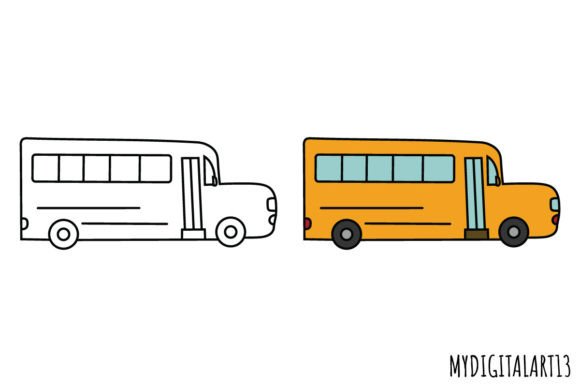
You’ll receive two distinct files per design: one full-color PNG and one black-and-white PNG. That pairing isn’t arbitrary—it’s strategic.
The color version delivers immediate visual impact. Use it for digital presentations, web banners, or vibrant printables where mood and energy matter. The black-and-white version opens up entirely different possibilities: coloring sheets for early learners, stencil templates for fabric painting, embossing guides for handmade cards, or high-contrast accessibility-friendly materials. Both share identical proportions and alignment, so swapping between them mid-project takes seconds—not hours.
This dual-format approach also supports layered design. Try placing the black-and-white bus beneath a semi-transparent gradient, then overlaying the color version at 30% opacity for subtle depth. Or use the B&W file as a clipping mask over a photo background to create a custom illustrated scene—no advanced software required.
Where These Images Fit in Real Projects
Let’s talk specifics—because abstract benefits don’t help when you’re staring at a blank Canva canvas at 10 p.m. Here’s how real users apply this School Bus Clipart:
Paper Products & Printables
Teachers printing classroom labels often need icons that scale without blurring. These 300 DPI files hold crisp detail even at 0.75 inches tall—perfect for drawer labels, behavior charts, or supply bins. For print shops producing custom notebooks or flashcards, the transparent background eliminates costly prepress fixes and ensures clean cuts during die-cutting.
Scrapbooking & Stickers
Digital scrapbookers love PNGs because they mix effortlessly with scanned photos, patterned papers, and handwritten journaling. Add a school bus near a photo of your child’s first-day outfit, rotate it slightly for dimension, and adjust blend mode to “multiply” for natural shadow integration. For physical sticker makers, the clean edges mean clean cuts—no white fringing around wheels or windows.
Web & Social Designs
Bloggers covering education topics use these graphics to break up text-heavy posts—say, illustrating a “Top 5 Tips for Easing First-Day Jitters.” Instagram educators embed them into carousel slides as visual anchors. Website designers add subtle bus motifs to navigation icons or loading animations to reinforce theme without clutter.
Craft Projects & Seasonal Decor
From laser-cut wooden ornaments to iron-on transfers for tote bags, the consistent line weight and simplified shapes in these illustrations translate beautifully across mediums. Because there’s no anti-aliasing fuzziness or gradient bleed, vinyl cutters read the outlines precisely—and heat presses transfer solid blacks without smudging.
What to Look For (and What to Skip)
Not all clipart labeled “school bus” delivers equal value. Before downloading or purchasing, check for three non-negotiable traits:
- True transparency—not just a white background you assume is “removable.” Open the file in preview mode: if you see checkerboard, it’s transparent. If it’s solid white, you’ll waste time masking later.
- Consistent DPI—many free downloads are 72 DPI, fine for web but blurry when printed. 300 DPI ensures fidelity whether you’re ordering 500 postcards or one large wall decal.
- Clean vector-derived edges—even as PNGs, these should look crisp at any size. Jagged lines or inconsistent stroke weights suggest low-effort tracing or screen grabs—not intentional design.
This School Bus Clipart set meets all three. It was crafted with scalability and practicality in mind—not just visual appeal.
Getting Started Without Overthinking It
You don’t need design experience to benefit. Start simple:
- In Microsoft Word or Google Docs: Insert → Upload → Place over a colored shape or behind text using “Wrap Text” → Adjust transparency if needed.
- In Canva: Upload to your brand kit → drag onto any template → resize freely → combine with filters like “Duotone” for custom color schemes.
- In Cricut Design Space: Upload as “Print Then Cut” or “Cut Image” → ungroup layers if the bus includes separate windows/wheels → weld or contour as needed.
The black-and-white version is especially forgiving for beginners—it works with default settings in most tools and rarely requires color correction or blending tweaks.
Final Thought: Function Meets Feeling
Great clipart does two things at once: it solves a technical problem (fast placement, clean scaling, format flexibility) while quietly supporting an emotional goal (welcoming, encouraging, celebrating learning). This School Bus Clipart set leans into both. It’s ready for Back to School, yes—but also for the quiet moments in between: the after-school snack, the field trip permission slip, the end-of-year memory book, the “I’m proud of you” note tucked into a lunchbox. When your visuals carry that kind of grounded warmth—and work flawlessly across every tool you own—you stop thinking about clipart altogether. You just make.